CarPlay HDMI Adapter – In-Car Adapter Compatible with Amazon Fire TV Stick, for Cars with Wired CarPlay


CarPlay HDMI Adapter – In-Car Adapter Compatible with Amazon Fire TV Stick, for Cars with Wired CarPlay
CarPlay HDMI Adapter – In-Car Adapter Compatible with Amazon Fire TV Stick
This CarPlay HDMI adapter lets you plug a streaming stick with an HDMI connector into a car that has factory wired CarPlay and see the stick's picture on the car's built-in screen. The supplier describes it as designed for the Amazon Fire TV Stick, with an HDMI port, a Micro USB port, a Type-C port and an LED indicator in a grey ABS and PC body. Easy Life Markets sells it as one adapter kit. The streaming stick itself is not included.
Most car screens have no HDMI input. What many of them do have is a USB port that speaks CarPlay. This adapter uses that route: it presents itself to the car through the wired CarPlay connection and passes along whatever is arriving on its HDMI port. The car thinks it is showing CarPlay, and the screen shows your stick's home page.
Safety First
Video on a dashboard screen is for passengers, or for the driver when the car is parked. Do not watch while driving, and check the rules where you drive, since many places restrict video in the driver's view.
What Is in the Box
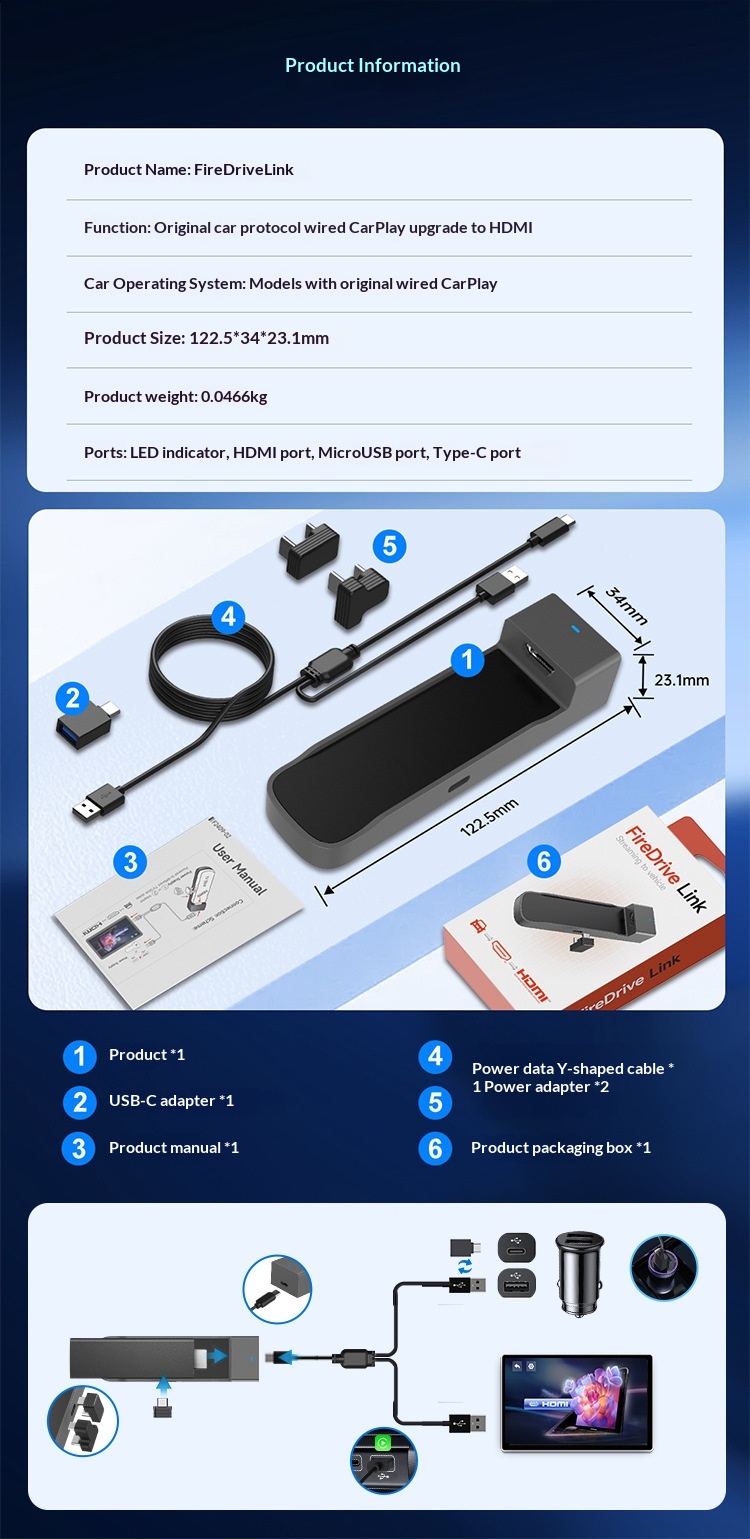
The supplier's short packing list says one adapter. Its product information picture is more detailed and shows:
- 1 × adapter
- 1 × USB-C adapter (USB-A to Type-C)
- 1 × power and data Y-shaped cable
- 2 × power adapters for connecting the stick, one for the 4K version and one for the 1080p version
- 1 × product manual
- 1 × packaging box
A streaming stick and its remote are not included. The supplier's picture states this plainly.
Specifications
- Function: Converts a car's original wired CarPlay connection to an HDMI input
- Works with: Cars that have original wired CarPlay
- Interfaces: LED indicator, HDMI port, Micro USB port, Type-C port
- Resolution: Adaptive; the supplier's picture quotes 1080p at 60Hz
- Size: 122.5 × 34 × 23.1 mm
- Weight: 0.046 kg
- Material: ABS and PC
- Colour: Grey
- Software: Supports over-the-air upgrade, per the supplier
- SKU: CJYD271159401AZ
About the Name and Packaging
The supplier's pictures show the product named FireDrive Link with CarlinKit markings. The option we stock is listed as "neutral packaging", which usually means a plain box, so the unit you receive may not carry those markings. We have not verified the maker and list the adapter without a brand claim of our own. Amazon and Fire TV are named only to describe what the adapter is designed to connect to. It is not an Amazon product.
Will It Work in Your Car? Check These First
- Wired CarPlay from the factory. This is the one requirement that cannot be worked around. The supplier states that the adapter is only applicable to wired CarPlay and does not support vehicles without it, and gives BMW and Tesla as examples of cars it does not suit.
- The USB data port. The adapter must go into the port the car uses for CarPlay, not a charge-only port. USB-A and Type-C ports are both covered with the included adapter.
- A power source. The Y-cable takes power as well as data. The supplier's connection picture shows the second plug going to a cigarette-lighter USB charger, which is not listed in the kit.
- Internet for the stick. A streaming stick needs Wi-Fi. In a car that means a phone hotspot or an in-car hotspot, and video uses a lot of mobile data.
- Your stick. The supplier's pictures show the adapter with several Fire TV Stick versions. The supplier does not list other brands of stick, so we do not claim them.
If you are not sure whether your car has wired CarPlay, send us the make, model and year and we will help you check before you order.
Connecting It
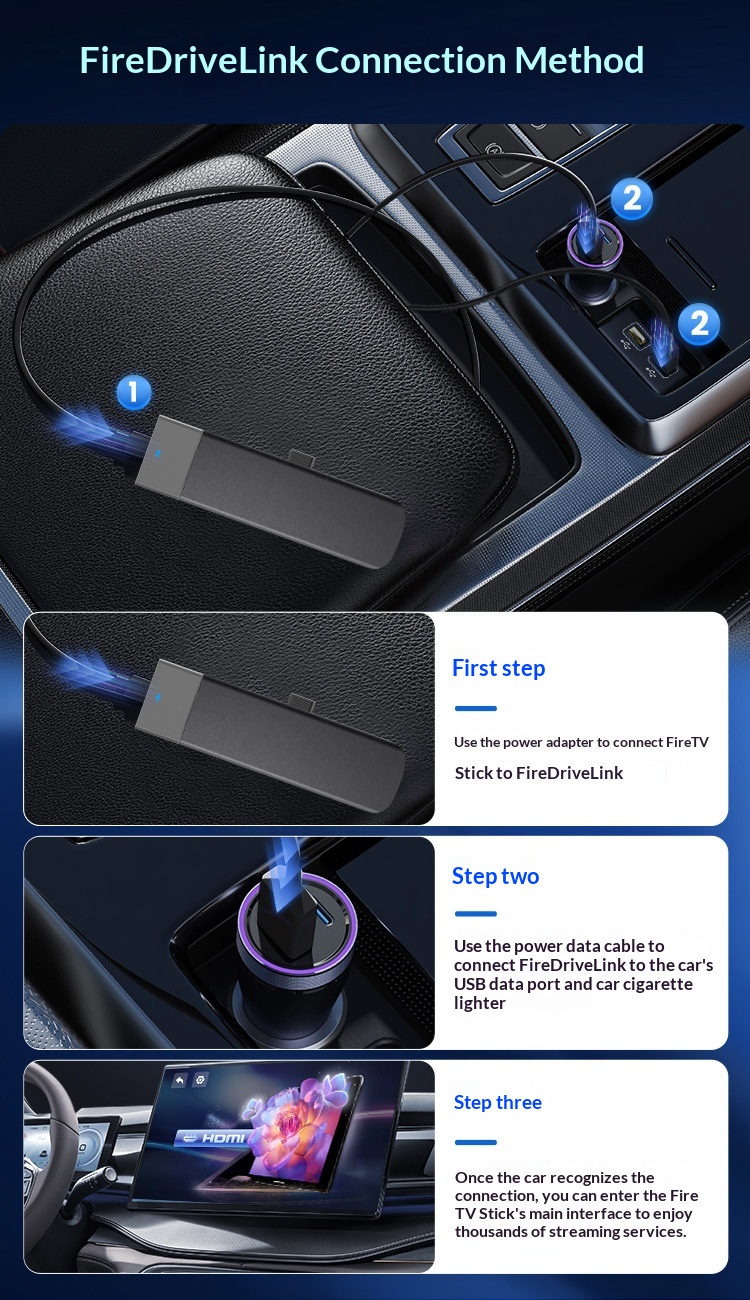
The supplier's three steps:
- Use the matching power adapter to connect the streaming stick to the adapter.
- Use the power and data cable to connect the adapter to the car's USB data port and to a USB power source.
- Once the car recognises the connection, the stick's main screen appears on the car display.
The supplier's pictures show the stick being operated with its own remote, so keep that in the car. The supplier does not describe the audio path. With a CarPlay connection, sound normally plays through the car's speakers.
Updating It
The supplier's instructions for the over-the-air upgrade say to connect the adapter to an external Wi-Fi network or hotspot first, then open the settings page on the car screen and run the upgrade. The same picture says the hotspot password must be 12345678 or blank for the upgrade to connect. If you change your hotspot password for this, change it back afterwards.
Who It Suits
Families on long trips who want films for the passengers, people who wait in the car and want something to watch while parked, and campers who use the car as a screen in the evening.
Common Questions
Does it work with wireless-only CarPlay? The supplier lists wired CarPlay only.
Does it work with Android Auto only cars? No. It needs wired CarPlay.
Can I plug in a games console or laptop? The supplier describes it only for a streaming stick. Other HDMI sources are not listed.
Is it certified? One of the supplier's pictures refers to an HDMI certificate. We have not seen the document and make no certification claim.
Buy the CarPlay HDMI Adapter at Easy Life Markets
The current price and availability are shown on this page. Please read our return and refund policy before buying.
Related Products
Browse our car electronics, automotive accessories and electronics collections.
Product Photos