T11 Wireless Earbuds – Bluetooth 5.0 Headset with LED Display Charging Case


T11 Wireless Earbuds – Bluetooth 5.0 Headset with LED Display Charging Case
T11 Wireless Earbuds – Bluetooth 5.0 Headset with LED Display Charging Case
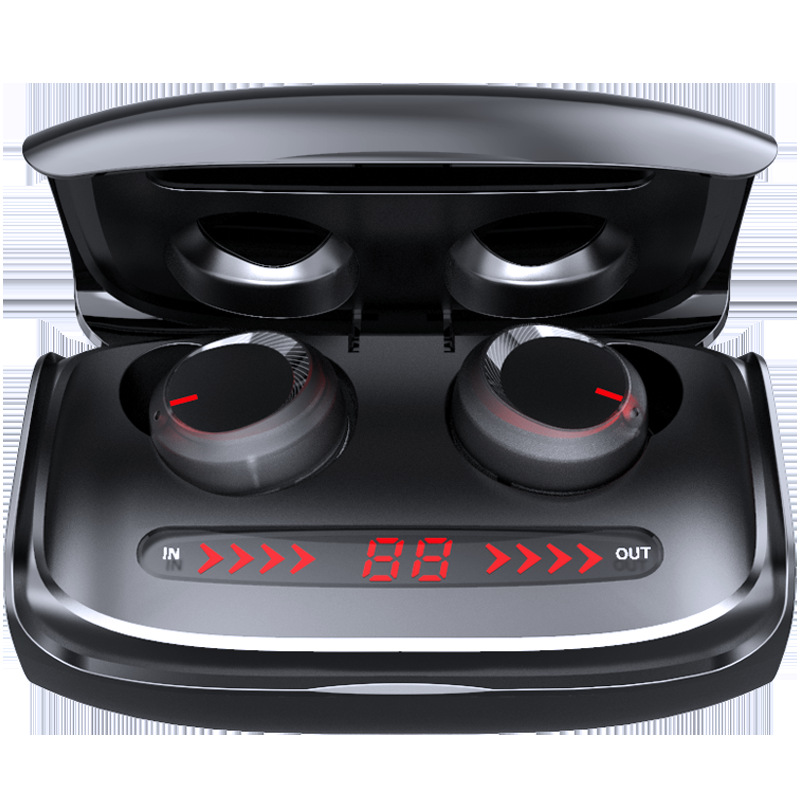
The T11 wireless earbuds are a pair of black in-ear buds supplied with a charging case that has a digital display on its inside face. The supplier lists Bluetooth 5.0, stereo sound, a 15 metre transmission range, call and voice control functions, and multi-point connection. Easy Life Markets sells them as a set with the charging case and a data cable.
The display is what sets this set apart from plain cases. Instead of guessing from a single blinking light, you open the lid and read a number. For anyone who has left for a long journey with headphones that turned out to be flat, that is a practical feature and not a gimmick.
What Is in the Box
- 1 × pair of earphones
- 1 × charging compartment (case)
- 1 × data cable for charging
A mains charger and spare ear tips are not listed.
Specifications
- Model: T11
- Bluetooth version: 5.0
- Transmission range: 15 metres
- Sound: Stereo, both ears
- Fit: Earplug style, in-ear
- Functions: Battery display, calls, voice control, music, multi-point connection
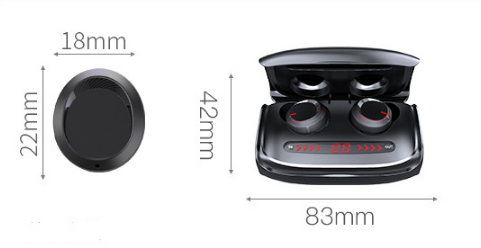
- Earbud size: About 18 × 22 mm, from the supplier's picture
- Case size: About 83 × 42 mm, from the supplier's picture
- Colour: Black
- SKU: CJEJ137306101AZ
The Charging Case
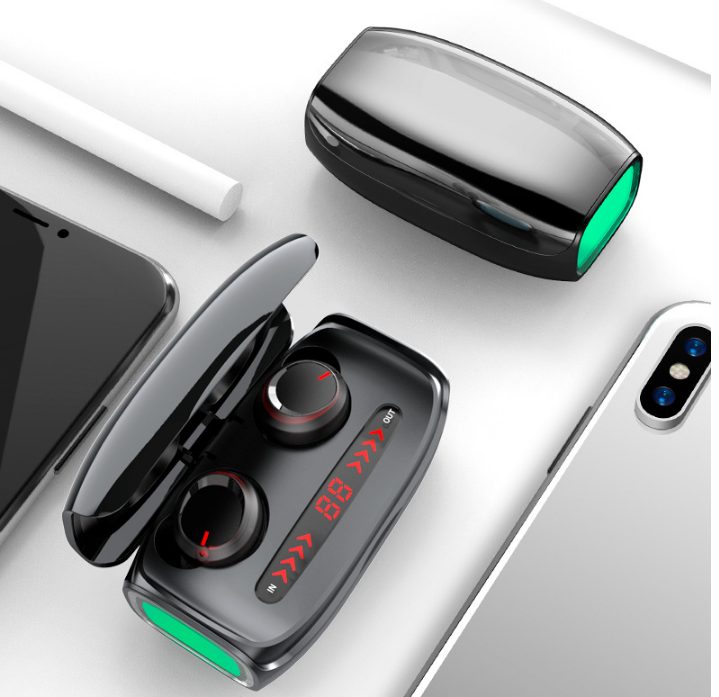
In the supplier's photos the case opens like a clamshell. The two buds sit in round wells, and below them is a red LED strip showing a two-digit figure with arrows labelled IN on one side and OUT on the other. The digits are the battery display the supplier lists. The arrows appear to show whether power is flowing in, when the case is on charge, or out. One photo also shows a green light at the end of the case. The supplier does not explain what that light is for, so we will not guess.
What the Supplier Does Not State
- Battery capacity and playing time. No figures are given for the buds or the case.
- Charging port type. A data cable is included, but the connector is not named.
- Water resistance. One of the supplier's pictures shows the buds dropped into a glass of water. No rating is given anywhere in the listing, so we do not describe them as waterproof. Treat the picture as decoration and keep them dry.
- Power bank use. The OUT arrows on the display suggest the case may be able to supply power, but the supplier does not list that as a function and we do not claim it.
The Listed Functions Explained
- Battery display: The figure on the case, described above.
- Call function: A built-in microphone lets you take calls without picking up the phone.
- Voice control: Listed by the supplier without detail. On earbuds this normally means a control that calls up the phone's own voice assistant, and what the assistant can do depends on the phone.
- Multi-point connection: Listed by the supplier. In general this means a headset can stay linked to two devices, such as a phone and a laptop. The supplier gives no detail on how it works on this model.
Pairing
The supplier gives no step-by-step instructions, so these are the general steps for earbuds of this type. The leaflet in your box takes priority if it differs.
- Charge the case with the supplied cable until the display shows a full reading.
- Open the lid and take out both buds. They normally power on and link to each other.
- Open Bluetooth settings on your phone, find the earbuds in the list and tap to connect.
- Put the buds back in the case and close the lid to switch them off and recharge them.
Getting the Best Sound
With in-ear buds, fit is most of the sound. Twist each bud gently until it seals the ear canal. If the bass is thin or the buds fall out, the seal is the problem, not the speaker. Bluetooth range is quoted in open space, so expect the 15 metre figure to shrink through walls and doors, and keep the phone on you when you are outdoors.
If Only One Bud Plays
Put both buds back in the case, close the lid for ten seconds and take them out together so they can link to each other again. If the phone still shows an old entry for the earbuds, remove it and pair afresh.
Care
- Wipe the buds and the charging contacts with a dry cloth.
- Do not charge the case on a bed or under a pillow.
- Keep the case out of hot cars and direct sun.
- Top the case up every couple of months if it is stored unused.
Who They Suit
Commuters and travellers who want to see at a glance how much charge is left, people who take calls on the move, and anyone who prefers the secure feel of an in-ear fit.
Common Questions
Do they work with Android and iPhone? They use standard Bluetooth 5.0, which both support.
Do they come in other colours? Black is the only option listed.
Do they have noise cancelling? None is listed.
Are they a branded product? They are sold under the T11 model name. We make no brand claim beyond the supplier's listing.
Buy T11 Wireless Earbuds at Easy Life Markets
The current price and availability are shown on this page. Please read our return and refund policy before buying, and contact us with any question the listing does not answer.
Related Products
- Wireless Bluetooth earbuds with round charging case
- 5 in 1 magnetic wireless charging stand
- 360 rotating desk phone stand
Browse our audio and headphones and electronics collections.
Product Photos